> ## Documentation Index
> Fetch the complete documentation index at: https://docs.dataville.com/llms.txt
> Use this file to discover all available pages before exploring further.
# Create an API key
> Dataville's API authenticates using an API key.
The Dataville API authenticates requests with an API key. Send the key in the `Authorization` header on every request.
Requests without a key are limited to data lookups, at 50 requests per 24 hours per IP address. This allowance is for evaluating the API before you create an account and is not compatible with production usage.
## Managing API keys
You can create and manage your API key on the [API Keys page](https://app.dataville.com/api-keys) of the dashboard. Keys start with `dataville_`.
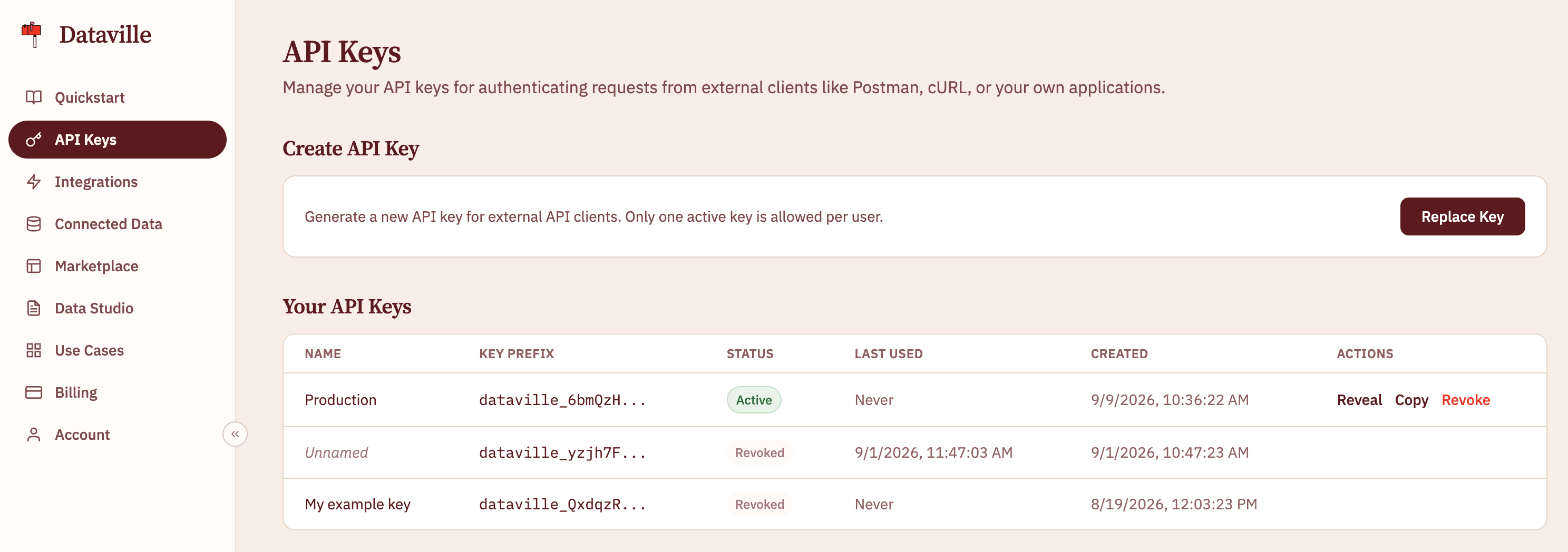 Each Dataville account can have one active API key. If you generate a new API key, your previous key will be deactivated.
## Sending the key
Send the key in the `Authorization` header using the `Bearer` scheme:
```
Authorization: Bearer dataville_xxxxxxxxxxxxxxxx
```
```bash cURL theme={null}
curl "https://api.dataville.com/wiki/Apollo%2011" \
-H "Authorization: Bearer $DATAVILLE_API_KEY"
```
```javascript JavaScript (fetch) theme={null}
const response = await fetch("https://api.dataville.com/wiki/Apollo%2011", {
headers: {
Authorization: `Bearer ${process.env.DATAVILLE_API_KEY}`,
},
});
```
```python Python (requests) theme={null}
import os, requests
response = requests.get(
"https://api.dataville.com/wiki/Apollo%2011",
headers={"Authorization": f"Bearer {os.environ['DATAVILLE_API_KEY']}"},
)
```
### Passing the key as a query parameter
Some clients cannot set request headers, including DuckDB's `httpfs` extension and DuckDB WASM. These clients can pass the key in the `token` query parameter:
```sql theme={null}
SELECT *
FROM read_parquet('https://api.dataville.com/api/v1/export/gutenberg?format=parquet&token=dataville_xxxxxxxxxxxxxxxx')
LIMIT 10;
```
The `token` parameter is accepted on data lookups, export downloads, and the MCP endpoint:
* `GET /{source}/{keywords}`
* `GET /https:/{wikipediaUrl}`
* `GET /api/v1/export/{source}`
* `GET /api/v1/export/dataville.db`, `dataville.csv.zip`, and `dataville.parquet.zip`
* `POST /mcp`
For security reasons, you should always use the `Authorization` header when possible. Passing API keys as a parameter is supported purely for compatibility reasons and should not be considered best practice.
## MCP authentication
You can also use your API key to authenticate with Dataville's MCP server. [Learn more on the MCP page](/ai-tools).
This documentation is built and hosted on [Mintlify](https://mintlify.com), a developer documentation platform.
Each Dataville account can have one active API key. If you generate a new API key, your previous key will be deactivated.
## Sending the key
Send the key in the `Authorization` header using the `Bearer` scheme:
```
Authorization: Bearer dataville_xxxxxxxxxxxxxxxx
```
```bash cURL theme={null}
curl "https://api.dataville.com/wiki/Apollo%2011" \
-H "Authorization: Bearer $DATAVILLE_API_KEY"
```
```javascript JavaScript (fetch) theme={null}
const response = await fetch("https://api.dataville.com/wiki/Apollo%2011", {
headers: {
Authorization: `Bearer ${process.env.DATAVILLE_API_KEY}`,
},
});
```
```python Python (requests) theme={null}
import os, requests
response = requests.get(
"https://api.dataville.com/wiki/Apollo%2011",
headers={"Authorization": f"Bearer {os.environ['DATAVILLE_API_KEY']}"},
)
```
### Passing the key as a query parameter
Some clients cannot set request headers, including DuckDB's `httpfs` extension and DuckDB WASM. These clients can pass the key in the `token` query parameter:
```sql theme={null}
SELECT *
FROM read_parquet('https://api.dataville.com/api/v1/export/gutenberg?format=parquet&token=dataville_xxxxxxxxxxxxxxxx')
LIMIT 10;
```
The `token` parameter is accepted on data lookups, export downloads, and the MCP endpoint:
* `GET /{source}/{keywords}`
* `GET /https:/{wikipediaUrl}`
* `GET /api/v1/export/{source}`
* `GET /api/v1/export/dataville.db`, `dataville.csv.zip`, and `dataville.parquet.zip`
* `POST /mcp`
For security reasons, you should always use the `Authorization` header when possible. Passing API keys as a parameter is supported purely for compatibility reasons and should not be considered best practice.
## MCP authentication
You can also use your API key to authenticate with Dataville's MCP server. [Learn more on the MCP page](/ai-tools).
This documentation is built and hosted on [Mintlify](https://mintlify.com), a developer documentation platform.