> ## Documentation Index
> Fetch the complete documentation index at: https://docs.dataville.com/llms.txt
> Use this file to discover all available pages before exploring further.
# Quickstart: Claude
> Add Dataville to Claude and ask for a company's most recent SEC filing.
Getting started in Claude takes a few minutes and no code. This quickstart will walk you through adding Dataville as a connector and asking for a company's most recent filing.
Sign up for a Dataville account. It's free to get started.
Sign-up for free.
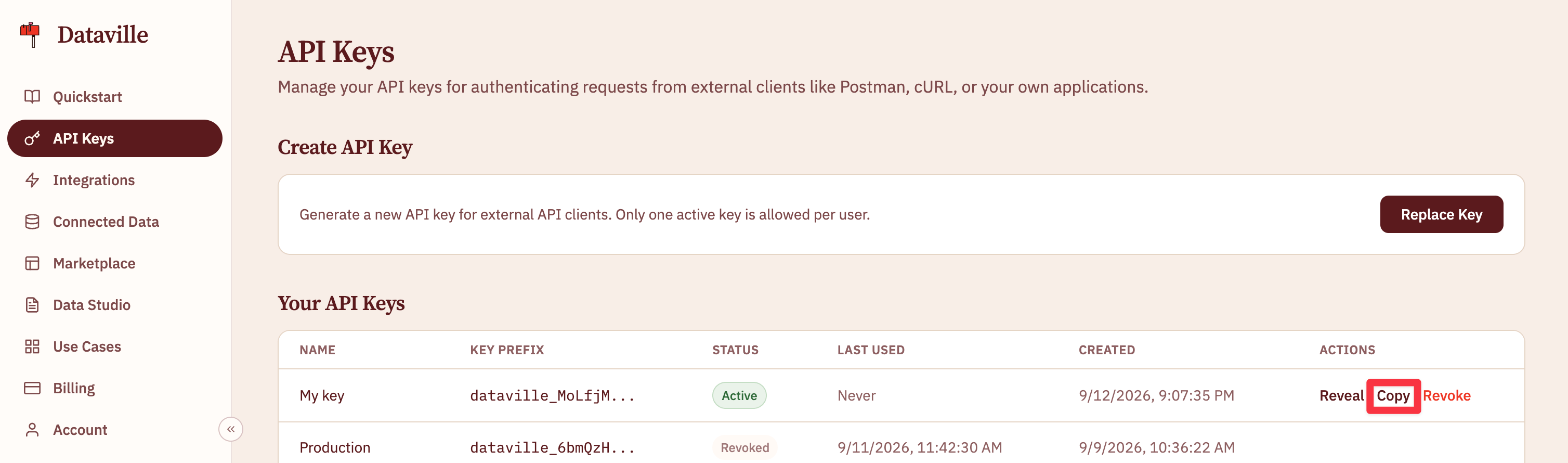
An API key is automatically generated for you when you create a Dataville account. You can find it on the [API Keys](https://app.dataville.com/api-keys) page.
 In Claude on the web or desktop, go to **Customize → Connectors**, click **+**, then **Add custom connector**, and enter this URL with your API key in place of `YOUR_API_KEY`:
```text theme={null}
https://api.dataville.com/mcp?token=YOUR_API_KEY
```
Dataville appears under Connectors, and you turn it on per chat. Custom connectors are available on every Claude plan. To use Dataville from Claude Code, Cursor, Windsurf, or VS Code, see [Connect an AI tool](/ai-tools).
Turn the connector on in a chat and ask something Claude can't answer from memory:
```text theme={null}
Using Dataville, what is Home Depot's most recent SEC filing?
```
Claude searches the `edgar` source and answers with the form type, the filing date, and headline figures from the filing such as revenue and net income. Claude's response lists a "Search a Dataville data source" step when the connector runs. If you don't see one, add "use Dataville" to the prompt.
## Next steps
Now you've asked Dataville a question from Claude, the same sources are available from a spreadsheet, from other AI tools, and from code.
Go from a competitor list in a Google Sheet to a comparison table in Data Studio.
Set up Dataville in Claude Code, Cursor, Windsurf, or VS Code.
Make the same request from code and read the JSON that comes back.
This documentation is built and hosted on [Mintlify](https://mintlify.com), a developer documentation platform.
In Claude on the web or desktop, go to **Customize → Connectors**, click **+**, then **Add custom connector**, and enter this URL with your API key in place of `YOUR_API_KEY`:
```text theme={null}
https://api.dataville.com/mcp?token=YOUR_API_KEY
```
Dataville appears under Connectors, and you turn it on per chat. Custom connectors are available on every Claude plan. To use Dataville from Claude Code, Cursor, Windsurf, or VS Code, see [Connect an AI tool](/ai-tools).
Turn the connector on in a chat and ask something Claude can't answer from memory:
```text theme={null}
Using Dataville, what is Home Depot's most recent SEC filing?
```
Claude searches the `edgar` source and answers with the form type, the filing date, and headline figures from the filing such as revenue and net income. Claude's response lists a "Search a Dataville data source" step when the connector runs. If you don't see one, add "use Dataville" to the prompt.
## Next steps
Now you've asked Dataville a question from Claude, the same sources are available from a spreadsheet, from other AI tools, and from code.
Go from a competitor list in a Google Sheet to a comparison table in Data Studio.
Set up Dataville in Claude Code, Cursor, Windsurf, or VS Code.
Make the same request from code and read the JSON that comes back.
This documentation is built and hosted on [Mintlify](https://mintlify.com), a developer documentation platform.